
Systems / SmartLocker
SmartLocker System
The right access.
For every withdrawal.
Materials in place. Access under control. Connected to Selecore Cloud.
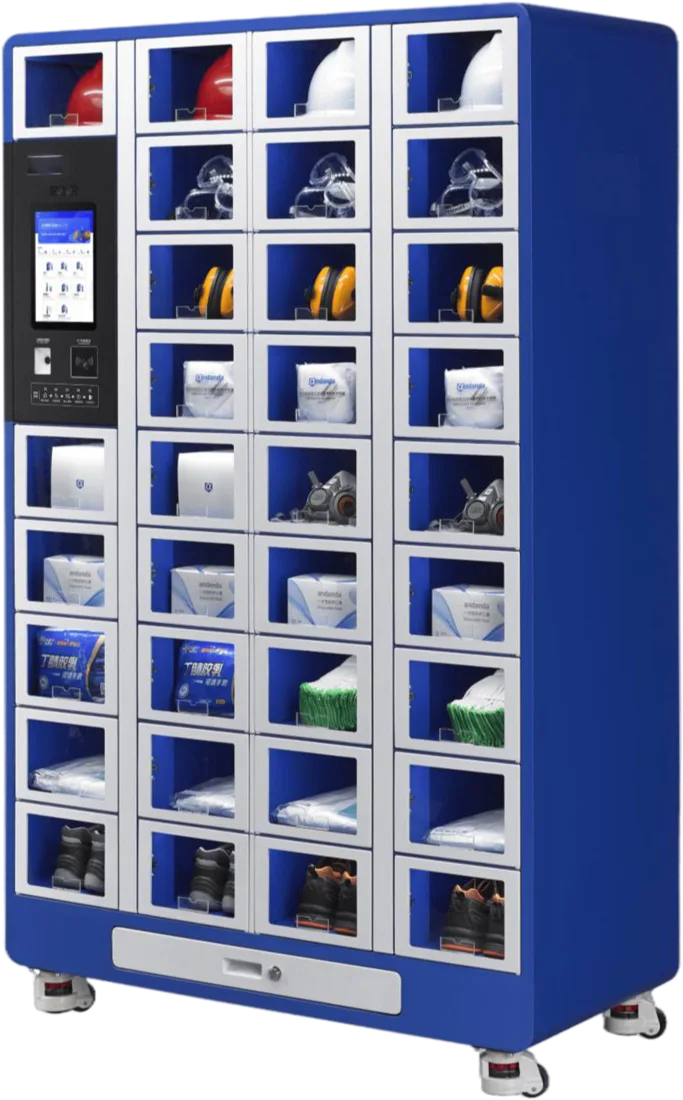
G50-33 / CONTROLLED ACCESS
01 / Access with a purpose
A dedicated place.
A clear process.
Individual compartments connect materials, users and access. You determine how dispensing is organised within your business.
01 / IDENTIFY
The user
comes first.
Users identify themselves at the system. The identification method, such as a card or facial recognition, is matched to the model and configuration.
Capabilities vary by model and software setup.
02 / More than dispensing
Withdraw.
Return.
Stay informed.
A user selects the required material. The corresponding compartment becomes accessible for withdrawal.
Process illustration. Return functions and recording are configured by compartment and application.
03 / The right layout
Different materials.
The right locker.
Size, compartment count and controls determine the right design. Explore the models in the SmartLocker family.
Locker with integrated controls
G50-33
33 individual compartments with an integrated touchscreen for targeted material dispensing.
- Dimensions · H × W × D
- 1950 × 1210 × 560 mm
- Compartment dimensions
- 169 × 229 × 546 mm
All technical specifications
- Total load
- Max. 500 kg
- Machine weight
- 265 kg
- Identification
- Card, facial recognition, QR code or code
- Power supply
- 220 V AC
- Power rating
- 55 W
Issue, return and identification are tailored to your items and software setup.
04 / Connected by Selecore
Access at the cabinet.
Insight in the Cloud.
Connect users and material transactions to your management environment, bringing the locker into the bigger picture.
Discover Selecore Cloud Platform ↗SMARTLOCKER →
Selecore CloudAvailability depends on the system and software setup.
PPE
A clearly identified place for personal protective equipment, close to the workplace.
Tools
Issue and, where configured, return of shared tools.
Technical items
Individual compartments matched to the size and use of your materials.
05 / Good to know
The right choice
starts with your process.
Can a SmartLocker also be used for returns?
Issue and borrowing/returning are configurable operating modes in the G50-33 documentation. We define the required workflow and records for each item and compartment.
Does every model have its own control screen?
No. Different designs are available within the family. We determine which controls and combination of modules suit your installation.
How does it differ from SmartWeight?
SmartLocker focuses on access to individual compartments. SmartWeight uses weight changes as the basis for stock recording. Your materials and workflow determine the best solution.
What materials can the compartments hold?
This depends on compartment dimensions, packaging and the desired dispensing process. We assess suitability using your actual items.
Your next step
Give every item
the right place.
Discover which SmartLocker design suits your people, materials and workflow.
Book a demo ↗